ictPrep | The Ultimate Edexcel & Cambridge ICT Learning Hub

Topic 3 – Online payment systems
We’ve learned about the risks to our data and how to protect it. Now let’s apply that to something most of us will do every day: paying for things online. Whenever you buy something on a website or app, your money and bank details are being sent across the internet. So how does that work, and how do we keep it safe? By the end of this section, you will be able to:
- Describe what an online payment system is and give examples (debit/credit cards, PayPal, digital wallets such as Apple Pay and Google Pay, bank transfers).
- Explain the steps involved in making an online payment, from entering your details to the seller receiving the money.
- Identify the security features that protect payments, such as encryption, HTTPS, one-time passwords (OTP) and two-factor authentication.
- Explain the risks, such as card fraud, phishing and fake shopping websites.
- Evaluate the advantages and disadvantages of paying online compared with paying in cash.
- Apply safe habits when paying online, for example using trusted sites and checking your statements.
3.1 Online third-party payment processors
A payment processor authorises financial transactions. Third-party processors such as PayPal or Skrill
let you create an account and then send and receive money using an email account for identification. Some
link with online shopping applications, which makes shopping easier and faster.
REAL-WORLD EXAMPLE
A big benefit is that you do not give your card number to every shop. You log in and approve the payment.
Apple Pay and Google Pay work in a similar way.
Scammers send fake “payment received” emails that look like PayPal. Protect your account with a strong,
unique password and two-factor authentication.
3.2 Bank cards
Bank cards let customers pay online and in shops. To pay online you usually enter:
• the card number
• the expiry date (and sometimes the start date)
• the name on the card
• the three- or four-digit card security code (CSC).
REAL-WORLD EXAMPLE
Never share your security code by phone, text or email. Use trusted shops and check statements for
payments you do not recognise. If card details leak in a data breach, criminals can try to use them online
without the card.
3.3 Contactless cards using NFC
Near field communication (NFC) lets payment data pass between a card and a reader over a very short
distance. The payment does not need a PIN or any other user authentication. If a card reader is in range
and requests payment, the contactless card will pay up to a maximum amount. The limit is kept low so
that criminals using card readers or apps can steal only a small amount.
The NFC signal is very weak, and cards can be wrapped in foil to stop criminals intercepting it. Figure 6.19
shows a criminal using a reader or app on a smartphone or smartwatch (a watch with data connectivity) to
try to take payment data from a victim nearby.
REAL-WORLD EXAMPLE
Phones and smartwatches: Apple Pay and Google Pay use NFC. You unlock the device with a fingerprint,
face scan or PIN first, and they send a one-time token instead of your real card number.
Limits: The maximum contactless amount differs by country and bank. Many banks ask for a PIN after
several taps. Signal-blocking wallets work like the foil in the textbook.
3.4 Protecting online payments using HTTPS
As you learned in 2.7, HTTPS authenticates the payment server, so you know you are talking to the real
shop or bank, and it encrypts the data using SSL or TLS, so card details cannot be read if intercepted.
Authentication depends on a digital certificate issued by a trusted company. VeriSign was one of the
best-known certificate providers; its certificate business is now part of DigiCert. When you visit a secure
site:
• your browser asks the website to prove who it is
• the website sends its digital certificate
• the browser checks that the certificate is valid and matches the website
• if it does, the browser and server set up an encrypted connection and the padlock is shown.
REAL-WORLD EXAMPLE
Before you type card details, check that the payment page address starts with https:// and that the domain
name is spelled correctly. If the browser warns that a certificate is invalid or the site is “Not secure”, stop and
do not enter any details.
Ready to explore?
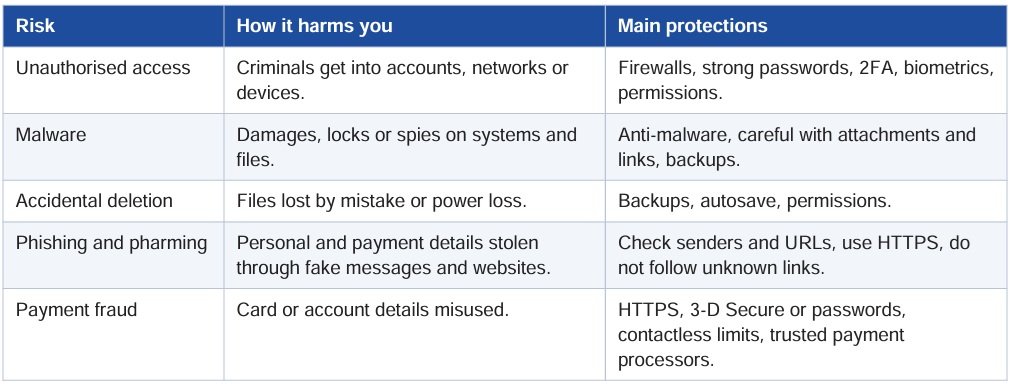
Don’t just memorise the names of cyber threats. Discover how phishing, malware and pharming really work, why firewalls, encryption and strong passwords protect us, and how your money and personal data are kept safe online.
Explore the sections below, test your knowledge, and build the confidence you need for your Edexcel IGCSE ICT exam. You might also protect your own accounts along the way!