ictPrep | The Ultimate Edexcel & Cambridge ICT Learning Hub

Topic 1 – Risks to data and information
Think about everything you keep on a phone or computer: photos, messages, passwords, school work. What could go wrong with it? By the end of this lesson, you will be able to:
- Explain what unauthorised access is and why it is a risk.
- Describe how malware can deliberately damage data.
- Identify how accidental deletion can cause data loss.
- Distinguish between phishing and pharming and explain how each works.
- Recognise these risks in real-life examples.
Unauthorised access
Unauthorised access means getting into a network, device or account without permission.
Criminals can try to guess login details directly. More often they write software that runs thousands of times per second, typing in one username and password after another until a login works. This is called a brute-force attack.
Networks with weak passwords are easy targets. Another trick is credential stuffing. Criminals take usernames and passwords stolen from one website and try them on many other websites. It works because many people reuse the same password everywhere. Criminals do not always steal data straight away. Sometimes they secretly add the hacked device to a botnet. The owner may never notice. The botnet, is a group of computers used for harmful purposes, can then send spam, spread malware or attack websites.
Deliberate damage by malware
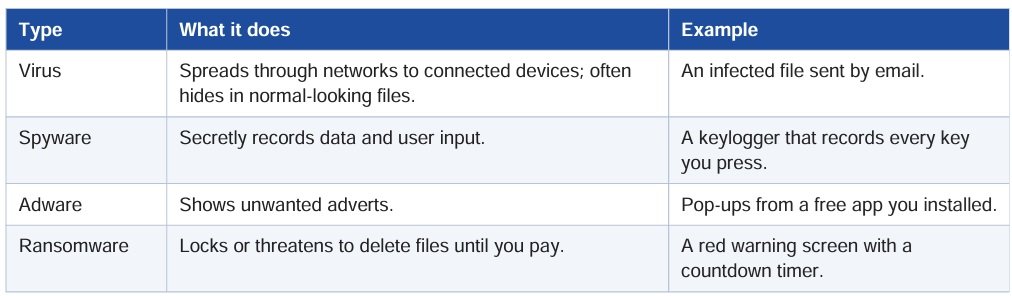
Malware (malicious software) is software created with the intention to do harm. It can show messages, play sounds, delete files or reprogram systems, harming the system and the connected hardware. Common types are:
Ransomware
Ransomware messages are usually written to frighten the user. They often include a countdown and say that files will be lost forever. This puts pressure on the user to pay quickly, usually to an anonymous account, before they have time to think clearly. Experts generally advise people not to pay. Instead,
disconnect the device, report the attack, and restore files from a backup.
Accidental deletion
Not every risk to data comes from criminals. Users can delete files, or even the whole contents of a drive, by mistake.
This can happen if:
- they press a key on the keyboard by accident
- they format media on the wrong storage device
- their device loses power unexpectedly.
- Saving over an old file is another common cause. You can reduce the risk with autosave, careful reading of confirmation messages, a battery or battery-backed power supply, and backups.
Theft of personal data: phishing and pharming
Criminals use several methods to steal personal data. The two you need to know are phishing and pharming.
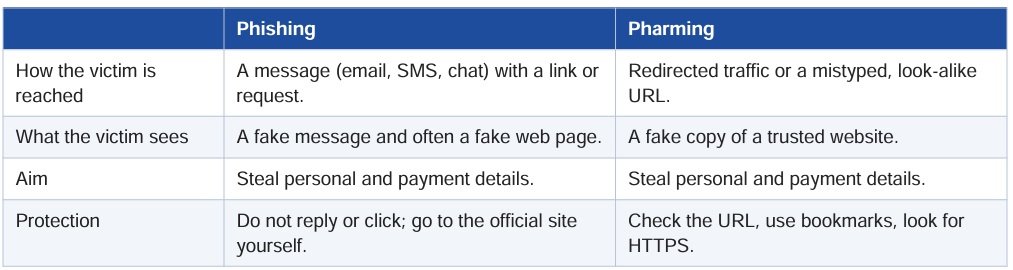
In both cases the aim is the same: to get personal information and payment details so they can get money or goods.
KEY TERMS
phishing – sending emails or running a website that is meant to trick people into giving away personal information such as a bank account number or password
webform – a data entry form on a web page
internet traffic – data transferred between computers connected to the internet
domain name server – a computer connected to the internet that translates domain names, such as pearson.com, into IP addresses
Phishing
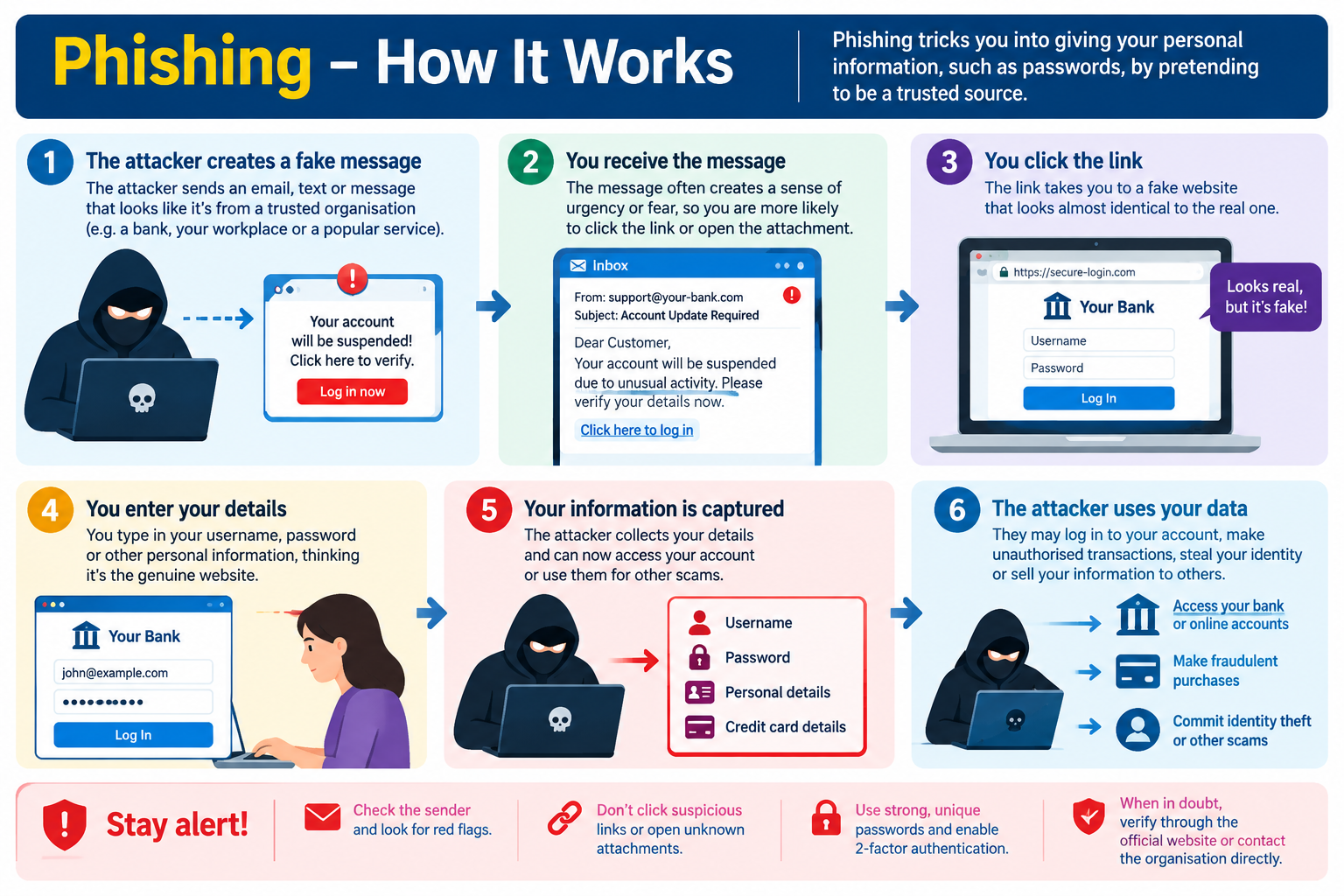
Phishing means sending large numbers of messages that seem to come from real organisations such as shops, banks or charities. The message asks you to reply with your details, or to follow a hyperlink to a web page where you type them in.
Clues that it is fake: you do not know the sender, the English is odd, the offer is too good to be true, and the sender’s email address looks wrong.
Pharming
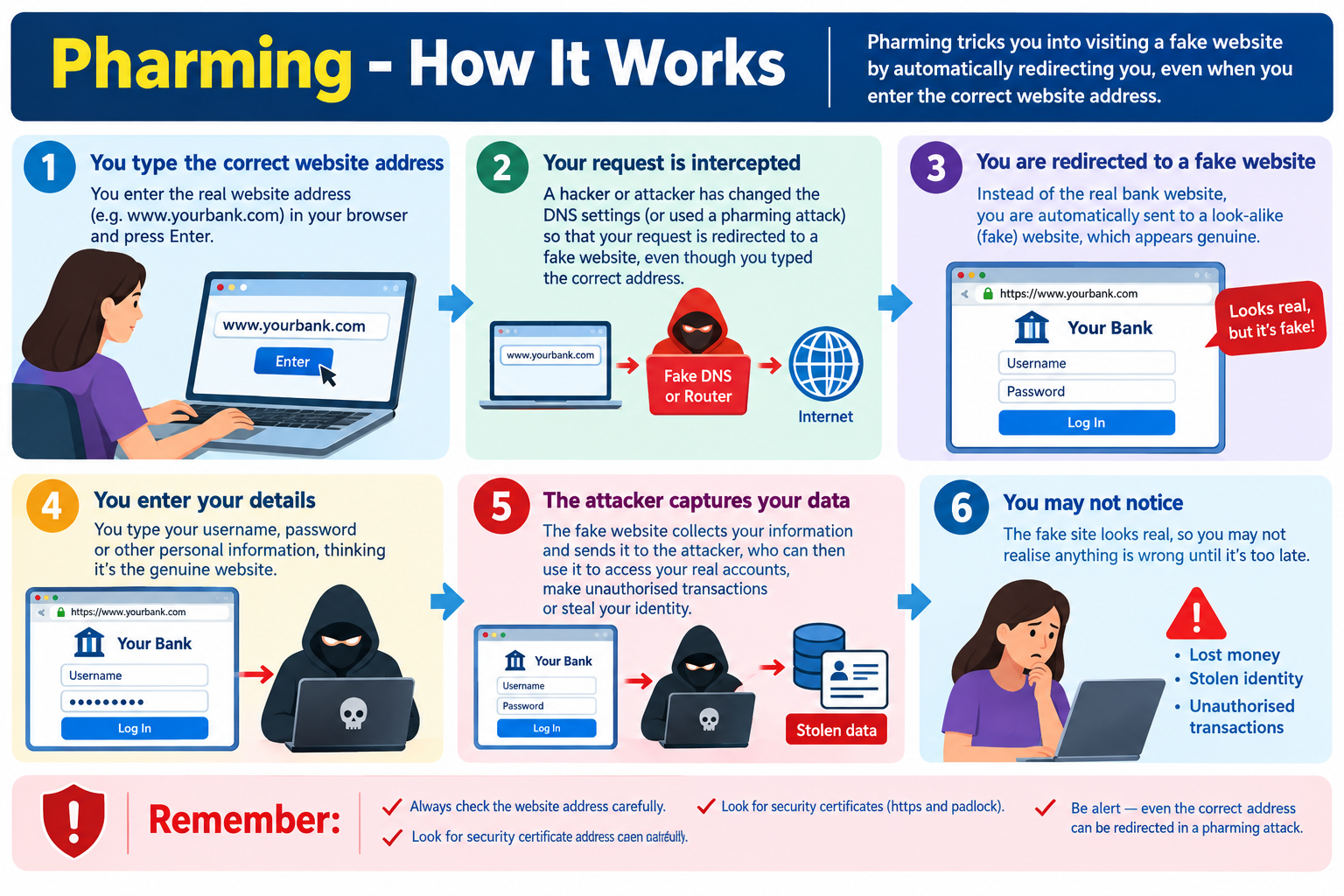
Like phishing, pharming steals login and payment details by using a fake version of a trusted website.
There are two main ways users are sent to a pharming site:
- Redirected traffic. Internet traffic meant for the real website is sent to the fake one. Criminals do this by changing the domain name servers, or by using malware to redirect web requests. You may type the correct address and still land on the fake site.
- Look-alike URLs. The fake address is very close to the real one. If the real bank is http://moneybank.lk and criminals create http://moneybamk.lk, one wrong letter takes you to the wrong place
Exam Tip
- Be able to define each risk precisely, not just name it: unauthorised access, malware, accidental deletion, phishing, pharming. Examiners want distinctions, e.g. phishing (fake emails/messages tricking a user into giving details) vs pharming (malicious code redirects a user to a fake website even when they type the correct URL).
- Expect “explain” or “describe” questions worth 2–4 marks — one mark for naming the risk, further marks for how it happens and its consequence (e.g. financial loss, identity theft, data corruption).
Exam Practice – Try the questions below to practise applying your knowledge.
1. What is meant by unauthorised access?
2. Explain what a botnet is and give one way criminals use it.
3. True or false: credential stuffing works because many people use the same password on different websites.
4. Why can a smart camera with its factory password still set be a danger to people who do not own it?
5. Define the term malware.
6. What is ransomware?
7. Why do ransomware messages often use threats and countdown timers?
8. In the Sri Lankan government email attack the backups were also affected. What lesson does this teach about backups?
9. Give three ways in which files can be deleted by accident.
10. Would anti-malware software help you get back a file you deleted by mistake? Explain.
11. Suggest one way to reduce data loss from a sudden power cut.
12. What does the GitLab story teach us about backups?
13. Define phishing.
14. How is spear phishing different from ordinary phishing?
15. What is SMS phishing sometimes called?
16. State two ways in which users are sent to a pharming website.
17. The real address is http://moneybank.lk. Why is http://moneybamk.lk dangerous, and how could you avoid it?