ictPrep | The Ultimate Edexcel & Cambridge ICT Learning Hub

Storage Devices
Have you ever wondered what happens to your unsaved school presentation when there is a power failure? If it’s stuck in the computer’s temporary memory (RAM), it vanishes instantly!
That is precisely why storage devices are essential.
While primary memory (RAM) acts like the computer’s short-term memory—fast, flexible, but completely wiped when the power turns off—storage devices (secondary storage) serve as the computer’s permanent digital vault. They keep your operating system, software programs, photo libraries, and homework files safe even when the power is off.
For your Edexcel IGCSE ICT exam, you need to understand:
- The difference between volatile and non-volatile memory.
- What is storage device and storage media
- The 3 main types of storage media – Magnetic Storage, Optical Storage, Solid-State Storage
- Cache memory
- Virtual memory
Mastering secondary storage isn’t just about listing drive names; it’s about evaluating which device fits a specific real-world scenario based on capacity, speed, portability, durability, reliability, and cost.
Learn it → Understand it → Use it → Score it!
Volatile vs Non-Volatile Memory
What happens to your data when you switch off the computer?
Some types of memory lose their contents when the power is turned off, while others keep their contents even without power.
Think about it:
If you are working on a document and suddenly the computer loses power, would everything in the computer’s memory still be there?
In this section, you’ll learn about volatile and non-volatile memory, how they work, and where each type is used.
What is Volatile Memory?
Volatile memory needs electrical power to keep its data.
When the power is switched off, the data stored in volatile memory is lost.
Example: RAM
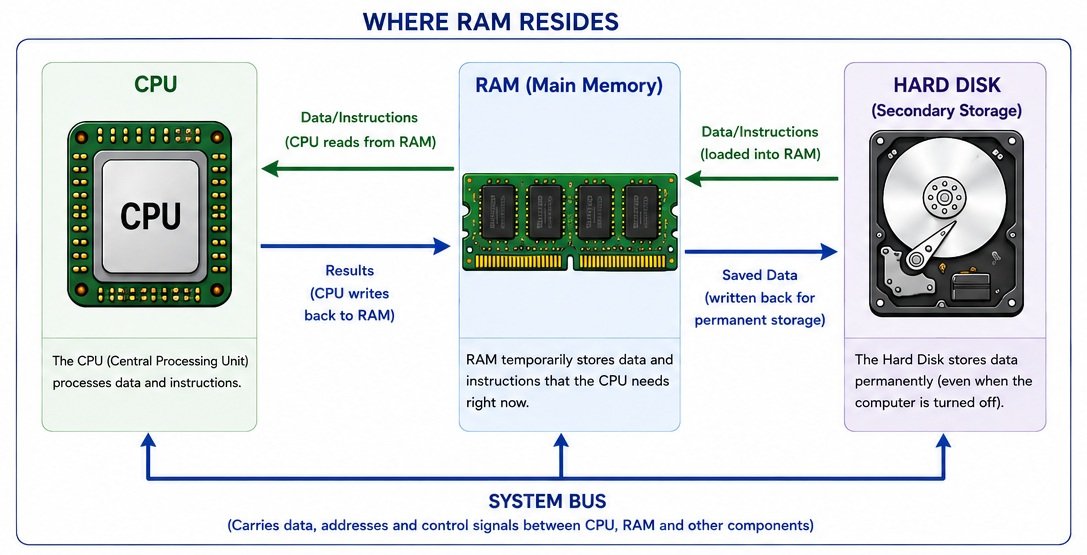
RAM (Random Access Memory) is a type of volatile memory.
The data and instructions needed by the CPU are temporarily stored in RAM. This allows the CPU to access them quickly.
Power ON → Data is retained
Power OFF → Data is lost
What is Non-Volatile Memory?
Non-volatile memory keeps its data even when the power is switched off.
The information remains stored until it is deliberately deleted, changed or overwritten.
Examples
- ROM (Read Only Memory)
- Flash memory
- SSD
- USB flash drives
- Memory cards
These are useful for storing information that needs to be retained when the device is switched off.
| Feature | Volatile Memory | Non-Volatile Memory |
|---|---|---|
| Needs power to retain data? | Yes | No |
| Data lost when power is removed? | Yes | No |
| Main example | RAM | ROM / Flash memory |
| Main purpose | Temporary storage | Long-term storage |
Exam Tip
Don’t simply write “RAM is temporary memory.”
For a question asking why RAM is volatile, explain:
RAM is volatile because it requires electrical power to retain its stored data. When the power is switched off, the data is lost.
Try It Yourself
Which type of memory would you use for each situation?
- Storing data that must remain after the computer is switched off
- Holding programs and data currently being used by the CPU
- Storing firmware that should remain when power is removed
Storage Devices and Storage Media
Device or Media?
You know that computers need somewhere to store data, but have you ever wondered what actually stores the data and what helps us access it?
For example, when you save a file to a hard drive, the hard drive is the device, while the medium inside it is where the data is stored.
🔑 The key idea:
Storage device = the hardware used to store or access data
Storage media = the material on which the data is stored
In this section, you’ll learn to identify storage devices and media, understand how they are used, and—most importantly—tell the difference between them.
A simple example
Think about a DVD:
- DVD drive → the storage device that reads the DVD
- DVD → the storage medium that contains the data
Another example:
- Hard disk drive (HDD) → storage device
- Magnetic disk inside the HDD → storage medium
Magnetic Storage Media
How can a computer store data using magnetism?
Magnetic storage uses magnetized material to read and write data. The data is written onto a magnetic surface and can later be read using a suitable storage device.
Examples
- Hard disk drives (HDDs)
- Magnetic tape
- Floppy disks
How does it work?
A magnetic storage medium has a surface that can be magnetised in different directions.
These magnetic changes represent the binary data (0s and 1s) stored by the computer.
Writing → magnetic patterns are changed
Reading → the patterns are detected and converted back into data
Exam Tip
You may be asked to:
- Define magnetic storage
- Give examples of magnetic storage media
- Explain how data is stored
- State advantages and disadvantages of magnetic storage
- Compare magnetic storage with optical and solid-state storage.
Optical Storage Media
How can data be stored using light?
You’ve seen how magnetic storage uses magnetism to store data. But what if a storage medium could be read using a beam of light?
That’s the idea behind optical storage. Optical storage media uses a laser beam to read data stored on the surface of a disc.
Examples of Optical Storage Media
- CD (Compact Disc)
- DVD (Digital Versatile Disc)
- Blu-ray Disc
How does it work?
A laser is used to read the data recorded on the disc. The surface of the disc contains tiny areas that reflect the laser differently. These differences are detected and interpreted as binary data (0s and 1s).
Laser → reads the disc → reflected light is detected → data is interpreted
Key points to remember:
Magnetic storage → uses magnetism
Optical storage → uses a laser
Solid-state storage → uses electronic memory
Exam Tip
You should be able to:
- Define optical storage
- Give examples of optical storage media
- Explain how data is read from an optical disc
- Compare CD, DVD and Blu-ray
- State advantages and disadvantages of optical storage
Solid-State Storage Media
What if storage had no moving parts?
Hard disk drives use moving mechanical parts, and optical discs use a laser to read data. Solid-state storage works differently. Solid-state storage uses electronic circuits (microchips) to store data, with no moving parts. Very fast in speed and durability.
Examples:
- Solid-state drive (SSD)
- USB flash drive
- SD card / memory card
How does it work?
Solid-state storage uses flash memory to store data electronically.
Data is stored in memory cells within the device. Unlike an HDD, there are no spinning discs or moving read/write heads.
Key points to remember:
Magnetic → stores data using magnetism
Optical → uses a laser to read discs
Solid-state → stores data electronically using flash memory
Key points to remember:
Data → stored electronically in memory cells → remains stored when power is removed
Exam Tip
You should be able to:
- Define solid-state storage
- Give examples of solid-state storage media
- Explain why solid-state storage has no moving parts
- State advantages and disadvantages
- Compare solid-state, magnetic and optical storage
A common advantage of solid-state storage is that it is faster and more resistant to physical shock than a traditional HDD because it has no moving mechanical parts.
Exam Practice – Try the questions below to practise applying your knowledge.
1. Magnetic Storage
(a) State two examples of magnetic storage media.
(b) Explain how data is stored on a magnetic storage device. [4 marks]
2. Hard Disk Drive (HDD)
A school stores large amounts of student work on a hard disk drive.
Explain two advantages and two disadvantages of using a hard disk drive for this purpose. [8 marks]
3. Optical Storage
(a) State three examples of optical storage media.
(b) Describe how a laser is used to read data from an optical disc. [5 marks]
4. Optical vs Magnetic Storage
A company needs to distribute a large amount of software to customers using a physical storage medium.
Compare the use of optical storage with magnetic storage for this purpose.
Your answer should consider capacity, speed, durability and portability. [8 marks]
5. Solid-State Storage
State three examples of solid-state storage devices and explain two advantages of solid-state storage compared with magnetic storage. [5 marks]
6. Choosing a Storage Device
A photographer needs a storage device to transfer photographs from a digital camera to a laptop. The device should be small, portable and have no moving parts.
(a) Name a suitable storage device.
(b) Explain why this device is suitable for the photographer.
(c) Give one disadvantage of using this type of storage. [5 marks]
7. Comparing Storage Technologies
Complete the table by identifying the most appropriate storage technology for each situation.
| Situation | Magnetic | Optical | Solid-state |
|---|---|---|---|
| (a) Storing several terabytes of data on a desktop computer | |||
| (b) Storing music on a portable device | |||
| (c) Distributing a film on a physical disc | |||
| (d) Storing files on a USB flash drive |
For each answer, give a reason for your choice. [8 marks]
8. Extended Question – Storage Media
A school is deciding whether to use HDDs, SSDs, optical discs or USB flash drives to store its data.
Discuss the advantages and disadvantages of each type of storage. In your answer, consider:
- storage capacity
- speed
- cost
- portability
- durability
- reliability
- whether the device has moving parts
Recommend the most suitable storage device for a school and justify your answer. [8 marks]